
Your shopping cart is empty!
 EN
EN  FR
FR 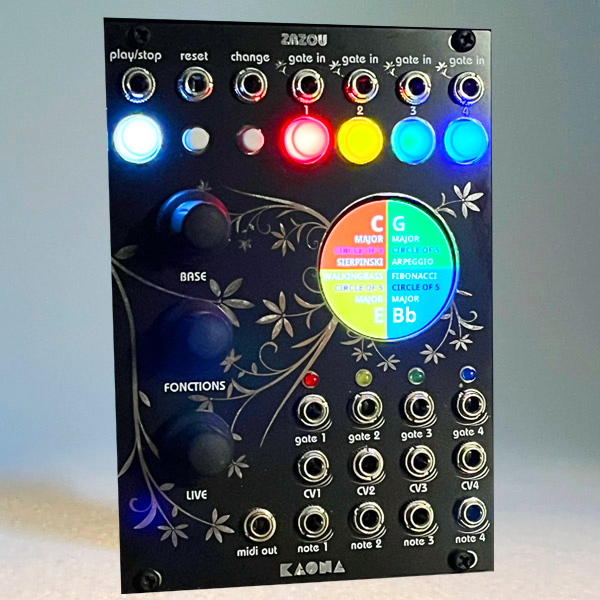
Zazou is a Eurorack algorithmic pattern generator, designed to seamlessly integrate into both modular and MIDI environments. It employs advanced algorithms to generate sequences and improvisations, enabling diverse musical exploration. Zazou offers musicians a structured yet flexible approach to music composition.
Connectivity: Zazou features a multitimbral MIDI output and Eurorack-compatible CV outputs, facilitating integration into your existing setup.
Interactivity: To trigger notes, Zazou relies on "gate" signals from sequencers or other generators, harmonizing seamlessly with devices like Skippy, Kaona's algorithmic rhythm generator.
Musicality: Zazou adopts a note division similar to keyboard instruments, fitting within equal temperament instruments with numerous scales and across 10 octaves.
Channel Versatility: Zazou handles four independent channels, offering fine harmonization possibilities for complex arrangements.
Four independent envelopes can be exported via MIDI or CV.
Varied CV Inputs: Seven CV inputs, including one gate per channel (red, yellow, green, blue), a "Reset" input, a "Change" input, and a "Play/Stop" input, provide precise control over musical dynamics.
Intuitive Manipulation: Seven buttons and three encoders offer swift interaction, allowing detailed sequence management and real-time adjustments.
Diverse Outputs: In addition to MIDI output, Zazou features 12 CV outputs, spread across gates, velocity, and notes, maximizing musical variation options.
Zazou operates in layers, from general choices like scale or root note to the finest parameters of chosen algorithms, through musical progression "methods" such as sequences. These choices determine melodic behavior, offering a range of options from controlled randomness ("Random") to complex explorations like Mandelbrot or Julia sets, and more traditional modes like "Walkingbass" or arpeggiators.
Random & Structured: From controlled randomness to rigorous serialism, each algorithm invites infinite exploration.
Mathematical Inspiration: Concepts like Cantor sets, Fibonacci sequence, or Sierpinski triangle transform into unique melodic patterns.
Fractal Explorations: Mandelbrot and Julia sets open up horizons of fractal complexity, making each composition infinitely unique.
Zazou is part of a Eurorack module set exploring composition, generative music, and musical research. With Skippy and Skippy Live, it offers a quirky and original approach to music creation.
Zazou is a generative music module based on numerous configurable algorithms. It acts as both an accompanist capable of syncing to a regular sequence and an improviser within a given framework. Its function is to produce notes: no sound comes directly from Zazou, as it's intended to be connected to one or more synthesizers or other Eurorack modules.
It features both a multitimbral MIDI output and Eurorack-compatible CV outputs.
To generate notes, Zazou requires "gate" signals to trigger each note. Therefore, it follows the rhythm imposed by a sequencer or any generator producing gate output. It pairs ideally with Skippy, Kaona's algorithmic rhythm generator.
Zazou produces music based on the equal temperament scale and follows the note division corresponding to keyboard instruments (piano, organ, etc.). Thus, in Zazou, as in a piano, a C sharp corresponds to a D flat.
Zazou produces notes on four independent channels that can nevertheless be tuned together.
One gate per channel: red, yellow, green, blue
One "Reset" input: realigns the tracks, resets the sequence, interrupts all MIDI notes currently playing.
One "Change" input: allows external sequence control.
One "Play/Stop" input: stops (or restarts) all produced notes and pauses the current sequence. This input also measures an external beat to determine the quarter note value (BPM) that Zazou will use (this value can also be set manually). The input can be a clock (set to one beat per quarter note) or a sequencer.
One per channel, matching its color: they function differently depending on the displayed screen. (Selection, Pause, or Manual Gate).
One Play/Stop button: stops or starts all tracks simultaneously.
One "Change" button: manually advances the sequence.
One "Reset" button: realigns the tracks, resets the sequence, interrupts all MIDI notes currently playing.
Their functions vary depending on the displayed screens.
The output is in TRS format. It's possible to choose between cable A or B using a switch on the back of the card.
Four "gate" outputs: mirror the input signals but add ornamentation notes.
Four CV outputs: export velocity (selectable between 5V or 8V).
Four Note outputs: in 1V/octave format, across 10 octaves.
All functions are identical for each channel but can be synchronized according to your composition criteria.
Root Note: determines the key each track plays in.
Scale: constrains Zazou to adhere to a given scale (22 scales available).
Sequence: dictates that the composition follows a given sequence.
Algorithm: allows the selection of melodic behavior.
Four independent envelopes can be exported via MIDI or CV. Three modes are available:
• Gate: ADSR + Curve, triggered per note
• Change: AD + Curve, triggered by the sequence and running across the whole sequence
• Step: each note is sent with its own velocity
It's possible to instruct Zazou to follow a sequence track by track, but it's often more musical to let the four tracks follow a single sequence. For example, you can choose the common II-V-I progression or the circle of fifths, but also use less common sequences. The sequence behavior can be customized by selecting the number of notes in the sequence, passing notes, alternating major and minor chords, etc. 25 new patterns in Version 2, with diatonic handling.
In the sequence settings, the Alternate m/M function has been replaced by HARMONY.
The HARMONY parameter determines how the module selects/adapts chords when the sequence changes (harmonic progression).
Depending on the mode, the module can:
– leave chords completely free;
– alternate major/minor;
– enforce diatonic coherence (chords compatible with the selected scale).
The algorithms determine the note behavior for each track.
It's possible to freely mix algorithms track by track, choose the same algorithm for all tracks, or the same algorithm for all tracks but with different behaviors.
Depending on the chosen parameters, they will generate more or less repetitive, varied, or complex melodies. Even though each note depends on an external gate, some algorithms additionally produce ornamentation notes like triplets or appoggiaturas.
Allows for completely random and unpredictable operation. However, one can influence how randomness occurs by changing event frequency or velocity, for example.
Walkingbass precisely follows the sequence in a classic Jazz walking bass manner, with one quarter note per beat. Numerous forms are offered, and it's possible to enrich the progression with ornaments or emphasize strong or weak beats, for example. 25 new patterns in Version 2.
Several types of arpeggios are available, and it's possible to choose direction (including random), chords used, ornaments, and their frequency, etc.
Starting from a reference note chosen within the scale, Zazou will traverse a selected number of octaves and notes according to a given interval.
Zazou will generate note sequences respecting the rules and principles of serial music. All theoretical parameters are available to practice the specific genre of dodecaphonic composition (inverse sequence, retrogrades, etc.).
The Cantor set starts with a segment (the complete range of available notes) and repetitively divides it, eliminating central segments. This creates a more or less detailed repetitive pattern depending on the chosen parameters. Enhanced mode in Version 2.
The Fibonacci sequence is used to calculate note heights within a scale starting from a chosen note and modifying it according to selected Fibonacci numbers. Interval modulation allows staying within a playable range while exploring rhythmic and melodic patterns generated by the sequence. Enhanced mode in Version 2.
The approach divides an octave into three equal parts (triads) and selects two for repetition, imitating how the Sierpinski Triangle is drawn by removing the central triangle and repeating the process on the remaining triangles. This divides the musical space according to the specified depth and plays notes based on this division, simulating the repetitive structure of the Sierpinski Triangle. Enhanced mode in Version 2.
The Mandelbrot set is one of the most famous fractal objects. Zazou maps this set into a musical representation to offer unique and varied sound structures. Since calculations are done in real-time, parameters can vary the melody's behavior infinitely. Enhanced mode in Version 2.
Like the Mandelbrot set, the Julia set offers fertile ground for musical experimentation, with opportunities to explore fractal complexity through sound. Julia sets are defined in the complex plane and produce complex fractal patterns. Here too, real-time calculations allow parameters to vary the melody's behavior infinitely. Enhanced mode in Version 2.
Inspired by Arvo Pärt’s aesthetic, Tintinnabuli layers a melodic line with a “triad voice.” Zazou moves the melody through the scale, while a second voice selects structural notes (the triad) around it. Because everything is computed in real time, the settings instantly reshape the balance between melodic motion and harmonic anchoring—shifting from a classic diatonic structure to more unpredictable interweavings.
Wander is a “controlled walk”: a melody moves across a range, mostly in small steps, punctuated by rarer leaps. Its originality comes from its attractor-like behavior: the line is drawn toward a “home” note, giving it a natural sense of return, cadence, and resolution without ever becoming repetitive. The calculations happen in real time, so you can continuously vary the walk’s stability, restlessness, and drift.
Archimedes turns the digits of π into musical phrases. Zazou extracts rhythmic and melodic motifs and then organizes them into “phrases” that evolve over time: small transpositions, call-and-response effects, or ornaments around the main motif. The result oscillates between a recognizable structure and constant variation. Here again, everything is computed in real time: the settings immediately influence direction, interval dynamics, and the way the line resolves back to the tonic.
Guidetone generates melodic lines that “aim” for target notes, in the spirit of guide tones in jazz harmony (root, third, fifth, seventh…). The melody moves and can incorporate controlled leaps and passing/escape notes to add relief, while maintaining a strong sense of trajectory.
It is possible to choose a corresponding MIDI port for each track. Depending on your setup, you can use Zazou in polyphonic mode (same MIDI number), multitimbral mode (one port per channel), or multichannel mode (multiple synthesizers).
The quarter note duration (BPM) can be adjusted manually or automatically (clock signal, sequencer, etc.).
For all algorithms, you can choose the note duration proportionally to the quarter note value or match this duration to the incoming "gate" duration for each track. Thus, it is possible to play very dynamically with a variety of connected instruments as long as they provide a "gate" signal.
The velocity value can be selected within the range of 0V -> 5V or 0V -> 8V depending on your modular equipment.
Zazou operates across 10 octaves, in MIDI or CV (1V/oct) for modular use. However, it is possible to limit the number of octaves, either to accommodate synthesizers that poorly support very high notes or to limit the voltage in a modular environment.
Two settings allow adjustment of the overall pitch and fine interval between notes (only for modular use).
The internal SD card allows you to save, within its capacity limit, either track parameters (and load them for another track, for example), sequence parameters, or the entire composition.
Warning: Version 1 and Version 2 saves are not compatible.
18 HP
Depth: 32 mm
Power consumption:
+12 V 200 mA
–12 V 0 mA
+5 V 0 mA
Supplied with power cable and and screws.
Firwmare 1.xx
Firmware 2.xx

How to perform the update:
All commercially available modules come equipped with the latest update. However, for those who are using older modules, it is possible to do it yourself.
If you don't feel comfortable with this technical procedure, please send me an email (contact at kaona.fr), and we will find an exchange procedure.
Download the desired firmware version and decompress it to obtain a file ending with .hex.
Remove Zazou from its location and UNPLUG the power cable from the module.
Use the following method from your computer (Mac, Windows, Linux). You do not need to remove the controller card (Teensy) to perform this operation (you will need a USB/micro USB cable and to download an application). https://www.pjrc.com/teensy/loader.html
When you connect Skippy to your computer, it is normal for it to start up as usual.
After applying the update method, Zazou will immediately restart and display "version 2.2" upon startup.
Disconnect the USB cable.
Make sure the SD card is still securely inserted.
Return the module to its location by reconnecting the power cable.


