
Your shopping cart is empty!
 EN
EN  FR
FR 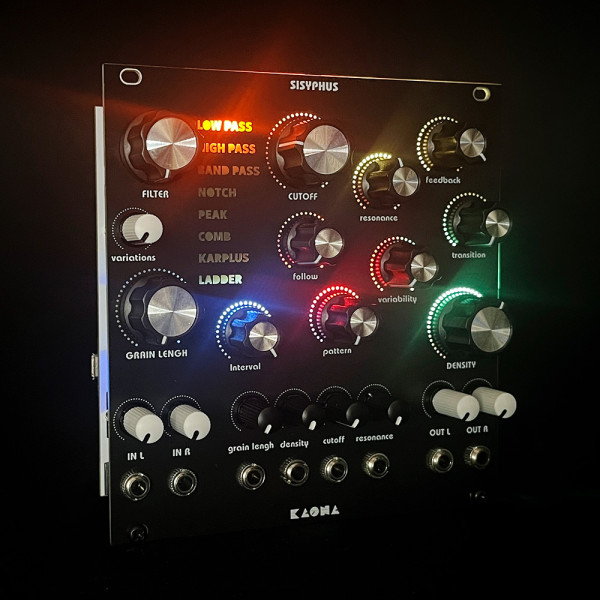
The new version of Sisyphus brings a major step forward, with a deeply expanded granular engine and a much broader sonic range.
This update introduces 14 granular patterns, each with its own personality, behaviour, colour, and way of shaping the sound. Depending on the selected pattern, Sisyphus can now enrich its textures with pitch shifts, detuning, chords, stereo movement, unstable repetitions, and denser, heavier structures made possible by the increased grain density.
Please refer to the new user manual for detailed information about each pattern.
The Variability control has also been extended well beyond simple intensity changes. It now influences multiple aspects of each pattern, including the depth of the effect, its intensity, its complexity, and sometimes even its nature. Grain length, interval, distribution, tuning, direction, and even spectral behaviour now open up a much wider field of exploration.
The engine has also been expanded to allow more detailed work on the sound itself: richer interactions between granulation and filtering, more lively modulation, more distinctive behaviours, and a palette ranging from subtle micro-variations to genuinely radical transformations.
Sisyphus is built around a granular engine and a palette of eight new filters. Its granular system allows multiple grains to coexist within a single stereo audio stream, where they combine and interact with each other.
This filter is based on a comprehensive granular approach to sound: rather than a granular engine followed by a filter, it offers true integration of filtering into the grain-generation process. Each generated grain carries the filtering characteristics defined by the musician and will be combined with other grains according to evolving, configurable patterns.
These filters have been developed entirely from scratch in-house, without using typical filter libraries, so they each have their own unique color for you to explore!
Lowpass
Attenuates high frequencies above the cutoff frequency. 12 dB/oct slope.
Highpass
Attenuates low frequencies below the cutoff frequency. 12 dB/oct slope.
Bandpass
Lets through a band of frequencies around the cutoff frequency. 12 dB/oct slope.
Notch
Dips around the cutoff frequency while letting the rest of the spectrum pass through.
Peak
Boosts the band around the cutoff frequency while allowing the rest of the spectrum to pass without a drastic cut.
Comb
Creates a series of cancellations and resonances based on an internal delay and feedback.
Karplus (Karplus-Strong)
Simulates the vibration of a string or looping resonance by combining a short delay, feedback, and damping.
Ladder
Inspired by Moog-style analog filters, with four stages in cascade. Features a steep slope (24 dB/oct) and a distinctive resonance that can reach self-oscillation.
Cutoff (Cutoff Frequency)
Defines the filter’s cutoff frequency or center frequency (depending on filter type), ranging from 10 Hz to 20 kHz.
Resonance
Emphasizes frequencies near the cutoff frequency, from a slight bump up to the edge of self-oscillation.
Feedback
Re-injects part of the output back into the filter input.
Variations
Introduces an instability in the setting of the cutoff frequency, resonance, or feedback (depending on the selected filter), allowing for a more or less “organic” filter character.
The incoming sound is continuously sampled and segmented into buffers. Each segment is analyzed, filtered, and then extracted to become a grain. You can change the length of each grain, the interval between grains, the way grains follow one another, how they are arranged in relation to each other, and their density (number and influence).
Grain Length
Adjusts the length of the audio grains. The shorter the grains, the more the sound fragments into a “grained” granular texture; the longer the grains, the closer the result is to the original sound, but filtered and delayed. When multiple grains are played simultaneously, longer grains make echo effects more noticeable.
Grain Interval
Determines the time between the start of two successive grains (or the probability of automatic triggering).
Pattern
Grains are organized according to predefined, adjustable patterns. Several scenarios allow you to explore different ways grains can combine, from highly organized to more chaotic.
Density
Determines how many grains are played simultaneously and their intensity.
Variability
Sets the magnitude of the special effects specific to each pattern.
Transition
Defines the shape of the envelope applied to the grains as they link together.
Sisyphus works with two parallel channels that share the same settings. You can use it either in stereo mode or as two separate mono audio channels.
Four CV inputs allow control of Sisyphus using other Eurorack modules. These inputs accept the standard Eurorack voltages (0 to 8 V).
The four basic parameters that can be controlled via CV are: Grain Length, Density, Cutoff, and Resonance.
However, you can configure the module differently using an external file on an SD card. In that case, any CV input can be assigned to any control, the input voltage range (from 1 to 8 V) can be set, LED brightness can be adjusted, and more.
Width: 24 HP
Power Consumption:
+12 V: 200 mA
–12 V: 10 mA
+5 V: 0 mA
Depth: 28 mm
Carefully built in France, with all potentiometers bolted to the front panel, and shipped in a metal storage box.
Power cable and and screws included.
Thanks Yi Jil for first test, music and video!


– Higher grain density
– 14 new patterns
– Patterns can now affect detune, stereo width, pitch, and grain reversal
– The Variability control now affects all pattern characteristics, not just their intensity
– New Follow algorithm for finer interaction between cutoff and patterns
– Transition glitches between filters have been removed, as well as self-oscillation issues (except with Peak)
– Wider stereo image, depending on the pattern
– Variations now bring more organic movement to cutoff and resonance
– Grains can now be longer: up to 3 seconds per grain.
– The possible interval between two grains has been doubled.
– There are fewer auto-oscillation “accidents.” However, it's still possible to induce auto-oscillation with certain filters.
– Setting the Density knob to 0 allows you to hear the sound just before it enters the filter: this sound is then used by the granular engine and filtering processes.
– With the Comb filter, the Cutoff knob now allows exploration of the filter’s unique resonances, while the Variation knob accentuates filter distortions.
– The pattern effects have been emphasized, exerting greater influence on the cutoff frequencies per grain.
All commercially available modules come equipped with the latest update. However, for those who are using older modules, it is possible to do it yourself.
Download the desired firmware version and decompress it to obtain a file ending with .hex.
Remove Sisyphus from its location and UNPLUG the power cable from the module.
Use the following method from your computer (Mac, Windows, Linux). You do not need to remove the controller card (Teensy) to perform this operation (you will need a USB/micro USB cable and to download an application). https://www.pjrc.com/teensy/loader.html When you connect Sisyphus to your computer, it is normal for it to start up as usual.
After applying the update method, Sisyphus will restart.
Disconnect the USB cable.
Return the module to its location by reconnecting the power cable.

